Guides
Repo card
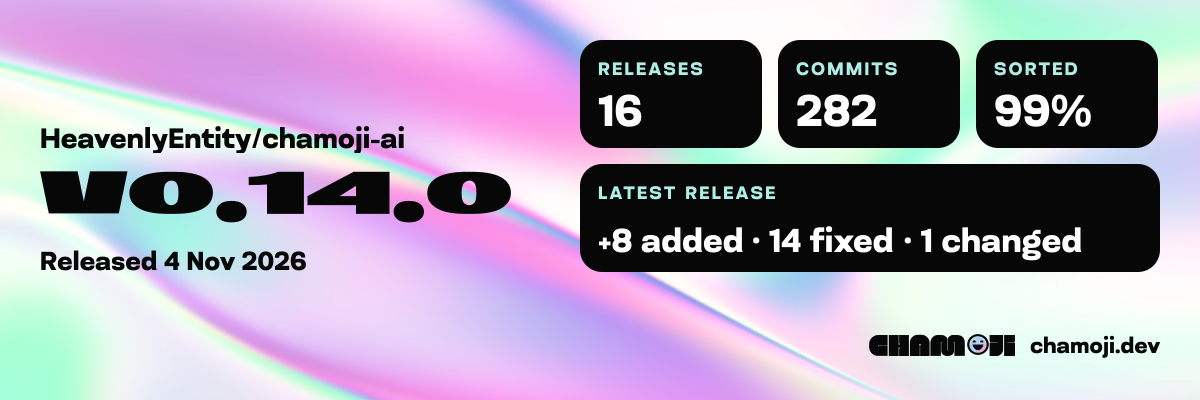
A repo card is an image of your project’s latest release, with a few counts from its history, to paste into your readme. The GitHub Action redraws it on every release and once a day, and keeps it on a branch of its own. Each card links back to chamoji.
GITHUB ACTIONSThe image’s address only works for a public repository. A private repo’s card won’t load for anyone who isn’t signed in to GitHub, and drawing it sends the repo’s name to chamoji.dev.
What the card shows
The card is a 1200 × 400 PNG. It shows:
- The repo, as
owner/name. - The latest release, such as
v0.3.0, and the day it was released. - Three counts: releases, commits, and the share of commits sorted, that is, outside Miscellaneous.
- The latest release’s changes, such as “+1 added · 0 fixed · 0 changed”.
A repo with no release tag yet shows “No releases yet”, and “First release next” where the latest release’s changes would go. chamoji’s own card is on its chamoji-card branch.
Add the workflow
Commit this as .github/workflows/card.yml. It redraws the card on every v* tag, once a day, and when you run it by hand:
.github/workflows/card.yml
name: card
on:
  push:
    tags: ['v*']
  schedule:
    - cron: '17 6 * * *'
  workflow_dispatch:
permissions:
  contents: write # the card branch
concurrency:
  group: card # one run at a time, so two runs can't race for the branch
jobs:
  card:
    runs-on: ubuntu-latest
    steps:
      - uses: actions/checkout@v4
        with:
          fetch-depth: 0 # chamoji reads every commit and tag
      - uses: HeavenlyEntity/chamoji-ai@v0.14.0
        with:
          mode: card
          chamoji-version: '0.14.0'
mode: card is needed: auto never picks it. Then paste this into your readme, with your own owner and repo:
readme.md
<a href="https://chamoji.dev">
	<img
		src="https://raw.githubusercontent.com/<owner>/<repo>/chamoji-card/card.png"
		alt="chamoji card"
		width="480"
	/>
</a>
The card shows up after the workflow’s first run.
What the job does
- Gets the card’s address. It runs
chamoji cardfor the repo the workflow runs in, which reads your history and prints the renderer’s URL with the counts in it. - Downloads the image. From that URL, with up to two retries and at most 30 seconds per try. An answer that isn’t a PNG is treated as a failure.
- Checks the branch. The
chamoji-cardbranch must not exist yet, or hold exactlycard.png. Anything else fails the job, and the branch is left alone. - Saves the card. If the image is the same as the one on the branch, it says “the card on
chamoji-card is already up to date”. Otherwise it replaces the branch with
one commit that holds only the new
card.png, asgithub-actions[bot], and pushes it.
The push only goes through if the branch hasn’t moved since the job looked at it. The card-url output is the image’s raw address, which is the one in your readme.
How it behaves
- Where it goes: a
chamoji-cardbranch that holds onlycard.png.mainand your tags get no bot commits.card-branchrenames the branch. - What it needs:
contents: writeandfetch-depth: 0. The push uses the credentialactions/checkoutleaves behind, sopersist-credentials: falsebreaks it. It doesn’t usegithub-token. - What it never overwrites: a branch that holds anything other than
card.png. - Which tags count: only semver tags, such as
v1.2.3or1.2.3.tags: ['v*']doesn’t start the workflow for a tag without thev, so the daily run picks that one up. In a monorepo whose units tag asweb/v1.2.0, the card has no version: it reads the repo as one package. - The counts are the rules’:
cardignores--ai, and the Action never passes it, so “sorted” counts only what chamoji’s rules sort. - Scheduled runs pause: GitHub stops scheduled workflows in a public repository with no activity for 60 days.
If the renderer fails
A card is decoration, so a renderer problem never fails the job. The Action warns, in the log and the job summary, and the branch stays as it was:
- It refuses the card: the warning names the HTTP status and the release, or the repo when there is no release, and ends “check the repo name and that the latest tag is semver such as v1.2.3, at most 64 characters”.
- It doesn’t answer, or answers with something that isn’t a PNG: “the card renderer didn’t answer, so chamoji-card keeps its last card”, or “didn’t send a PNG”.
On a first run, the warning says the branch “has no card yet” instead. The next run tries again.
With the release job
A tag that mode: release pushes doesn’t start other workflows, because the job pushes it with GITHUB_TOKEN. The daily run catches up, or add a card step after the release step. Mark it continue-on-error: true, so a card problem never fails a release:
.github/workflows/release.yml
- uses: HeavenlyEntity/chamoji-ai@v0.14.0
  with:
    mode: release
    chamoji-version: '0.14.0'
- uses: HeavenlyEntity/chamoji-ai@v0.14.0
  continue-on-error: true
  with:
    mode: card
    chamoji-version: '0.14.0'
GitHub Action has the whole release workflow.
What is sent
The renderer at https://chamoji.dev/api/card draws the card from the URL alone. The URL holds the repo name, the latest tag, its date and six counts, and never any commit text. The Action fetches it from GitHub’s runner, so for a private repo, its name reaches chamoji.dev.
The renderer refuses details it can’t draw, such as a repo that isn’t owner/name or a tag that isn’t semver or is longer than 64 characters. The card-endpoint input, or chamoji card --endpoint, points at another renderer.
The URL changes whenever a count does, which is why the readme points at the image on the branch: its address stays the same.
What chamoji card prints
chamoji card prints the URL, and sends nothing itself. These are real runs in widgets, with three releases and origin at https://github.com/acme/widgets.git:
chamoji card
$ chamoji card
https://chamoji.dev/api/card?repo=acme%2Fwidgets&version=v0.3.0&date=2026-11-05&releases=3&commits=8&sorted=62&added=1&fixed=0&changed=0
Three of widgets’ eight commits are too vague for any rule, so 62% are sorted. A repo with no release tag yet has no version or date. This one has two commits, with origin at git@github.com:acme/gadgets.git:
chamoji card
https://chamoji.dev/api/card?repo=acme%2Fgadgets&releases=0&commits=2&sorted=100&added=2&fixed=0&changed=0
card explains each count, and every flag.